
Start with a clear operating model
An online Quran academy needs a simple answer to a few foundational questions: who receives an enquiry, who confirms enrolment, who assigns a teacher, who records progress, and who follows up when something changes. These responsibilities can be held by one person in a small academy or divided among an administrator, academic coordinator and teachers as it grows. What matters is that the hand-offs are visible and repeatable rather than relying on memory or private messages.
Write down the learner journey from first enquiry to regular review. Include what information is collected, when fees or policies are discussed, how trial classes are arranged, and what marks a student as active, paused or withdrawn. A short operating guide gives new team members a reliable starting point and makes gaps easier to spot. It also helps owners separate essential work from habits that consume time without improving the student experience.
Organize enquiries, enrolment and onboarding
Use one shared enquiry record instead of leaving leads in several inboxes or chat threads. Capture the learner's name, age group where relevant, time zone, preferred days, learning goal, guardian contact and source of the enquiry. A coordinator can then note the next action, such as a call, assessment or trial class. This reduces duplicate follow-up and ensures that a prospective student receives a considered response even when the usual contact person is unavailable.
Once a learner joins, confirm the class time, teacher, online meeting method, attendance expectations and the right contact for practical questions. Give families one concise welcome message with the information they need first, rather than a long stream of separate updates. Keep the enrolment record connected to the assigned class so an administrator can see whether every student has completed the necessary onboarding steps.
Define teacher roles, availability and class assignments
Teacher scheduling works best when availability is maintained as a shared source of truth. Record each teacher's available days, time-zone details, class capacity and any subjects or learner levels they are prepared to teach. Before confirming a student's slot, check the actual availability record rather than relying on a past conversation. This avoids overlapping bookings and makes it easier to offer an alternative when a requested time is not possible.
Be specific about what a teacher is expected to update after class. A useful minimum may be attendance, the lesson or topic covered, a short progress observation and any homework or follow-up item. A coordinator should own assignment changes and substitutes so that students and families receive a clear message when a teacher is away. Clear role boundaries protect teaching time and help the academy maintain a consistent learning experience.
Make class schedules and delivery dependable
A dependable timetable shows the student, teacher, day, start time, duration and delivery method in one place. Establish a process for rescheduling: who can approve it, how much notice is expected, where the new time is recorded and how everyone is notified. Separating a requested change from a confirmed change prevents accidental double-booking and reduces confusion across different time zones.
Keep routine class information simple. A teacher needs the relevant learner details and class plan; an administrator needs enough visibility to resolve missed sessions and schedule changes. The goal is not to monitor every teaching moment. It is to make the agreed schedule dependable, provide a sensible response when a class does not take place, and maintain an accurate record of what was delivered.
Track attendance, homework and learner progress
Attendance is useful only when it leads to a practical next step. Record whether a class was attended, missed by the student, cancelled by the academy or rescheduled. Use the same definitions every time so a monthly report is meaningful. When missed classes begin to repeat, a coordinator can identify whether the issue is timing, communication, teacher availability or a learner who needs a different arrangement.
Progress notes do not need to be lengthy. A brief, consistent entry such as the material covered, recitation or memorization observation, homework and next focus gives the next teacher or administrator helpful context. Decide how often families receive a summary and keep it proportionate to the academy's teaching model. The important point is that progress is recorded in a way the academy can review, not only remembered by an individual teacher.
Set communication expectations early
Choose the official channel for routine announcements, schedule changes and guardian questions. A small academy may use a shared messaging workflow; a larger one may need separate coordination and teacher channels. In either case, tell families what type of message belongs where, when they can expect a response and who to contact about teaching, scheduling or administration. This stops important requests from disappearing among informal conversations.
Keep a record of decisions that affect a student's timetable, teacher assignment or learning plan. Teachers should know when to pass a request to an administrator rather than trying to resolve matters outside their role. Calm, consistent communication builds trust, especially when an absence, technical interruption or timetable change needs to be handled quickly.
Review quality and reporting on a regular rhythm
Operational reporting should answer ordinary management questions: How many active students are there? Which classes are regularly missed? Where is teacher capacity tight? Are new enquiries receiving a timely reply? Are progress records being kept? A weekly operational check and a more considered monthly review are often enough for a developing academy. Use reports to start conversations and improve workflows, not to create unnecessary administrative work.
Quality review can include a simple check of lesson records, a discussion with teachers about recurring barriers, and a clear process for feedback or concerns. Agree in advance how the academy will respond to a missed update or a learner whose progress needs attention. Consistency is more valuable than an elaborate report that nobody has time to maintain.
Treat student data, privacy and safeguarding with care
Keep only the information the academy genuinely needs to provide its service, and make sure people can access only the records relevant to their role. Avoid sharing full student lists, personal contact details or sensitive notes in broad group chats. Use individual accounts or controlled shared records where possible, remove access when a role changes, and agree how long routine records should be retained.
Safeguarding and privacy duties can vary by location, the age of learners and the academy's circumstances. This guide is not legal advice. Academy leaders should document their own policies, explain appropriate contact boundaries to staff, and seek qualified local guidance when they need help meeting applicable requirements.
Know when spreadsheets begin to create friction
A spreadsheet can be a sensible starting point for a small academy with a limited number of classes and a clear owner for the data. The difficulty begins when one change has to be copied into several sheets, when teachers need different views, or when attendance and progress information arrive through separate messages. Duplicate records, outdated copies and unclear permissions can gradually make ordinary tasks harder than they need to be.
First simplify the process itself: remove unused fields, agree on common status labels and decide which record is authoritative. Not every academy needs a custom system. Some will continue to work well with a carefully managed spreadsheet and a few standard templates. The right decision depends on the workload, complexity and frequency of mistakes—not on the appeal of adding technology.
A practical online academy operations checklist
Review this list before adding another tool or changing a major workflow. If the team can keep these basics current, the academy has a stronger foundation for growth.
- Keep one current record for every student, guardian contact and assigned teacher.
- Confirm each teacher's availability before promising a regular class time.
- Record attendance and an agreed progress note after each class or teaching day.
- Use a predictable communication channel and response process for routine questions.
- Review missed classes, teacher capacity and learner progress on a regular schedule.
- Limit access to student information to people who genuinely need it for their role.
See a working operations-focused project
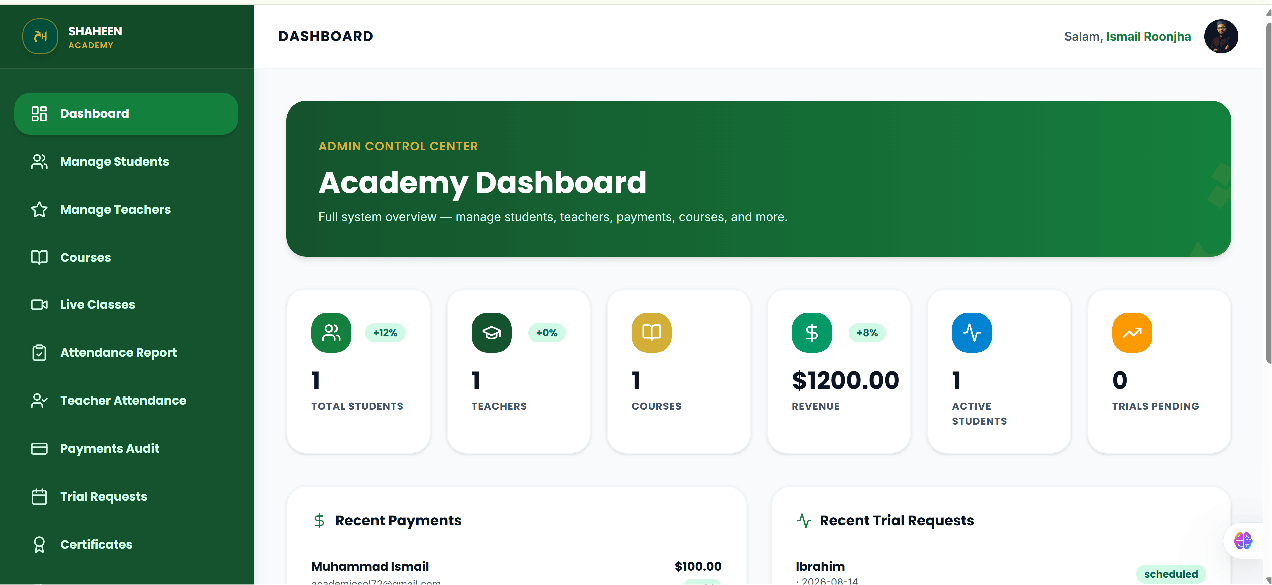
The dashboard below is working project proof from the Shaheen Quran Academy LMS concept. It illustrates how student, class and administrative workflows can be organized in one interface; it is not presented as a client delivery. You can view the Shaheen Quran Academy working LMS project for a closer look at the concept and its documented scope.
When a custom management system may be worth evaluating
It may be time to evaluate a tailored system when routine work is repeatedly being duplicated, the academy has multiple user roles with different access needs, or reports require a great deal of manual assembly. A custom approach can also be considered when the academy's actual workflow does not fit the limitations of ready-made tools. That is an evaluation step, not an automatic next stage for every academy.
Before discussing a build, define the current process, the main friction points and the smallest useful improvement. If a tailored option becomes appropriate, explore the scope of a custom academy management system with a clear record of the workflows it should support.
For a feature-by-feature way to compare a possible system against those workflows, see the Quran academy management software features checklist.
If the next question is whether to adopt an existing product or commission a tailored system, compare custom Quran academy software with ready-made SaaS.