
Begin with the academy's actual workflow
A useful discussion about Quran academy management software features starts with ordinary work, not a generic product checklist. Map what happens from the first enquiry through enrolment, class assignment, attendance, progress updates and routine review. Ask who performs each step, what information they need, and where a delay or mistake currently occurs.
Online Quran academy management system features should support the academy's own size, teaching model, budget and operational needs. A small team may only need a dependable set of records and a simple schedule. An academy coordinating several teachers may need clearer assignments and role boundaries. Comparing Quran school management software features against these real conditions keeps scope practical.
Student enquiries, enrolment and records
Start with one current record for each prospective and enrolled student. An enquiry workflow may need the learner's name, preferred schedule, time-zone details, learning goal and a suitable contact method. Once enrolment is confirmed, the record can hold the assigned class, teacher, status and relevant notes. The purpose is to make the next administrative step visible without searching through separate messages or spreadsheets.
A student and teacher management system becomes more useful when its records are connected to actual responsibilities. An administrator should be able to confirm whether a learner has an active class. A teacher should only see the information needed for assigned students. Before selecting a feature, decide what counts as a complete enrolment and who is responsible for correcting an outdated record.
Teacher profiles, availability and class assignments
Teacher information should reflect the details that help the academy make sound assignments: available days and times, time-zone information, learner levels or subjects they can support, and current class commitments. Keeping this information in a shared, controlled place makes it easier to verify a slot before it is offered to a student.
Class assignment features should make changes explicit. When a student moves to a different time or teacher, the academy needs a visible effective date and a clear notice process. Do not assume every academy needs complex capacity calculations or extensive staff records. The essential requirement is a dependable view of who is teaching whom and when.
Courses, classes and schedule management
Courses and classes should be represented separately when that matches the way the academy works. A course can describe a learning path, while a class identifies the particular teacher, students, day, time and duration. This distinction helps an administrator see whether a schedule change affects one learner, a group, or a wider set of recurring sessions. It is also helpful when records need to show the material or level associated with a class.
Look for simple schedule controls before advanced options. The system should make confirmed times, reschedules and cancellations clear to the appropriate people. Consider time zones, recurring classes and how a missed session is recorded. LMS features for Quran academies should reduce timetable ambiguity rather than add work.
Attendance tracking and practical follow-up
Attendance should show more than a simple yes-or-no result. Agree on a small set of statuses such as attended, missed by the student, cancelled by the academy or rescheduled. When everyone uses the same definitions, a coordinator can see patterns without having to interpret personal notes. The record can then support a practical next action, such as a reminder, a make-up arrangement or a discussion about the learner's regular time.
Academy attendance and reporting software is not automatically necessary for every small program. A shared sheet may suffice when one person keeps it current. A dedicated feature becomes more relevant when the academy is repeatedly consolidating separate teacher updates, needs different views for different roles, or cannot obtain a reliable picture of missed classes.
Homework, progress and assessment records
A useful progress record is short enough to complete after teaching and consistent enough to be understood later. It may include the material covered, an observation about recitation or memorization, agreed homework and the next focus. The exact structure should match the academy's curriculum and teaching style.
Assessment features can be considered where the academy has a defined review method and people responsible for using the results. For some academies, a periodic teacher note is enough. Others may need a shared view of progress at particular learning milestones. Decide in advance who can update, review and correct those records so that they remain helpful during teacher changes or academic review.
Reports and certificate workflows
Reporting should answer management questions the academy genuinely asks: How many students are active? Which classes have repeated absences? Where is teacher capacity limited? Are progress records being completed? Start with the smallest set of views that supports a weekly or monthly review. A report that requires constant manual cleanup may signal that the underlying records or status definitions need attention before a new dashboard is introduced.
Certificate workflows should be evaluated in the same way. If an academy has clear criteria and a repeatable approval process, a structured record can reduce re-entry. If criteria change frequently or certificates are rare, a simple manual workflow may be more appropriate. The question is whether the feature makes an existing process more reliable, not whether it adds an impressive-looking module.
Role-based access and data protection
A role-based academy management system should reflect real responsibilities. An administrator may need a broad operational view, while a teacher should normally see only assigned students, classes and related records. Start by listing the roles the academy actually has and the actions each needs to take. More roles are not necessarily better if they make access hard to understand or manage.
Treat learner and contact information with care. Keep only records the academy needs, avoid sharing sensitive details in broad messages, and remove access when a team member's role changes. Privacy and safeguarding requirements vary by location, learner age and circumstance, so this guide is not legal advice. Academy leaders should maintain appropriate policies and obtain qualified guidance where needed.
Communication and notification requirements
Before evaluating notifications, decide what messages matter and who should receive them. Schedule changes, confirmed enrolments, missed classes and progress updates may need a documented communication path. Routine messages should not depend on a staff member remembering to copy the same details into several places. At the same time, avoid introducing notifications that create more alerts than useful action.
Some academies can manage communication well with agreed templates and one official channel. Others may benefit from more structured reminders as their classes grow. Define a response owner, sensible timing and the information that belongs in each message before adding a feature. This makes the eventual tool choice easier to test against the academy's actual communication habits.
Optional integrations and deployment considerations
Optional integrations should be considered only when they remove a verified duplicate task or improve a critical hand-off. For example, an academy may review whether enquiries from its website need a clearer route into the enrolment workflow, or whether approved records need to move between existing administrative tools. Each connection adds setup, data-handling and maintenance questions, so it should have a clear owner and a defined reason for being included.
Deployment planning is also an operational decision. Before introducing a system, agree who will maintain user access, how current data will be prepared, what staff need to learn, and how the academy will handle corrections after launch. A focused first release with a clear handover plan is usually easier to assess than a large collection of untested features.
A practical feature-evaluation checklist
Use this checklist when deciding whether a proposed feature belongs in the first scope, a later phase, or not at all.
- The feature solves a documented task in the academy's current workflow.
- The people who will use it can identify what information they need and what they should update.
- The record has a clear owner and does not duplicate a separate source of truth.
- The academy can explain who needs access and what they should be able to do.
- The feature can be introduced and maintained within the academy's available time and budget.
- The initial scope can be reviewed after real use before more modules are added.
What belongs in an initial MVP and what can wait
An initial MVP should focus on the smallest connected set of features that improves the academy's highest-friction work. For many teams, that may mean current student records, teacher and class assignments, a dependable timetable, attendance and a basic progress update. These features create a useful operational foundation without asking staff to adopt every possible workflow at once.
More detailed reports, advanced assessment structures, certificate automation or optional integrations can often wait until the academy has used the essentials and identified a clear need. A later phase should respond to observed friction, not a wish to fill every menu with options.
A sensible initial focus
Prioritize the records, schedules and routine updates needed to run classes consistently and understand what needs follow-up.
A later-phase decision
Add further reporting, assessment or integration work only after real use shows where the academy needs more structure.
See a working LMS concept
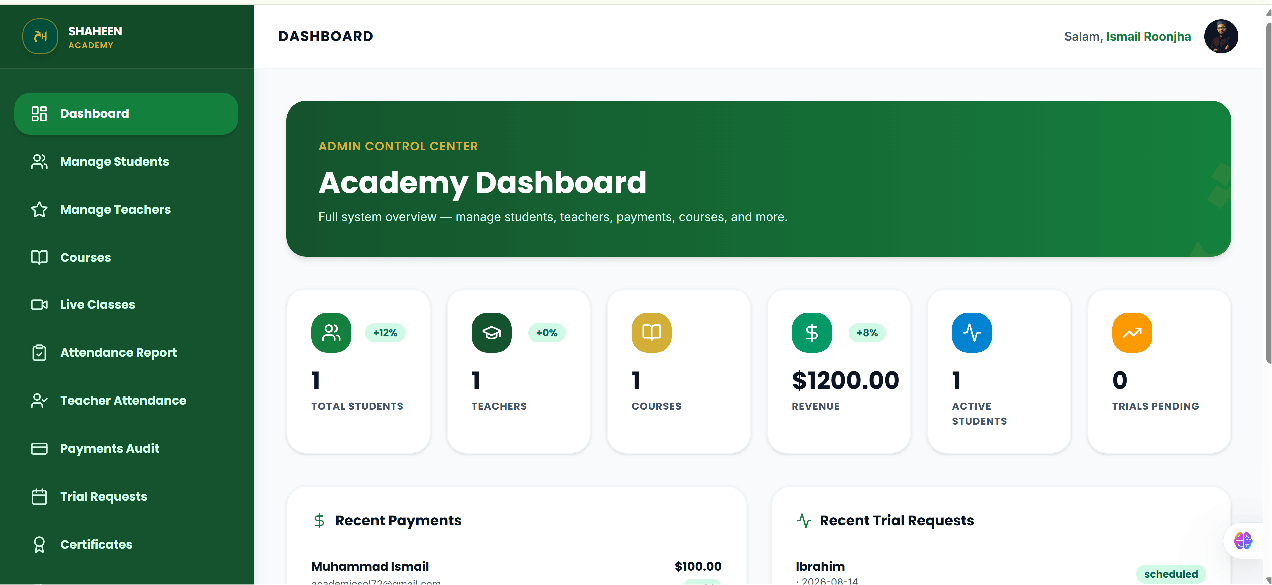
The dashboard below is working LMS proof from the Shaheen Quran Academy concept. It illustrates structured student, class and administrative workflows; it is not presented as a commercial client delivery. You can view the Shaheen Quran Academy working LMS project to see the documented concept in more detail.
When ready-made software may be sufficient
Ready-made software may be sufficient when an academy has standard workflows, a small feature requirement and a team comfortable adapting to an established way of working. It can be a practical starting point when the available options match the academy's essential records, schedules and reporting needs without forcing staff to maintain duplicate work elsewhere.
Custom development may be worth evaluating when the academy's core workflow does not fit available tools, multiple roles need clearly different access, or routine administration has become difficult to reconcile across separate records. That does not make a tailored system the automatic answer. First define the operational problem and the smallest useful scope. If that evaluation points to a tailored solution, learn how to approach a custom academy management system.
Put features into an operational context
A feature list is most useful when it is tested against daily work. For the operating model behind enrolment, teaching, communication and review, read our guide to managing an online Quran academy.
When you are ready to compare delivery models as well as features, read our guide to choosing between custom academy software and ready-made SaaS.